加载中
IoT Connectivity / One of the Twelve Core Subsystems

Call the Lift, Light the Way, Dispatch the Job — Devices Follow Your Robots

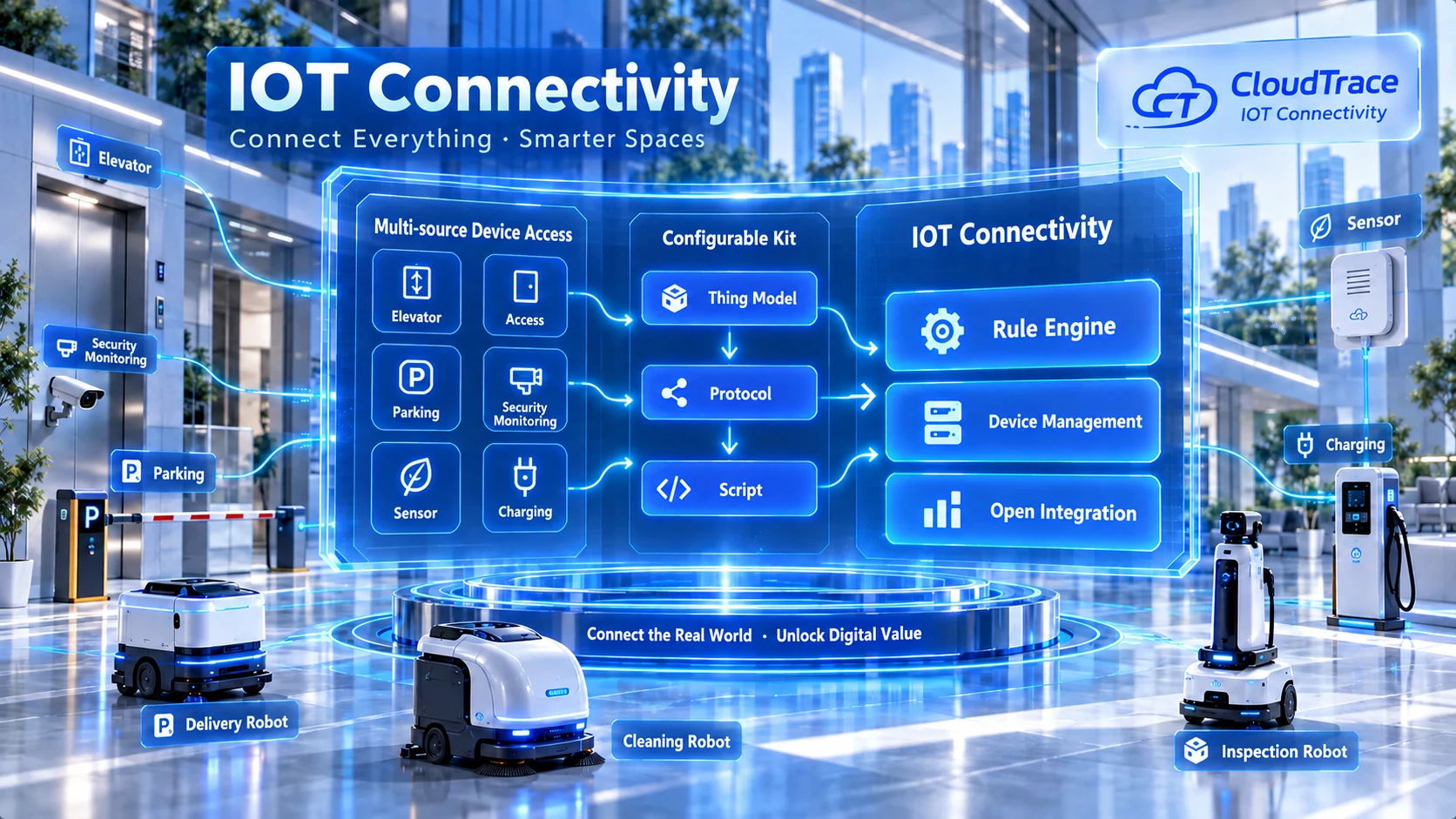
Connect elevators, doors, barriers, sensors, charging piles and cameras of any protocol via configurable thing models, protocol plugins and parsing scripts — zero-code for standard protocols, one script for private ones — and orchestrate them with delivery, cleaning and inspection robots into automated workflows.

8+ protocol families20+ product templates50k+ TPS per tenant
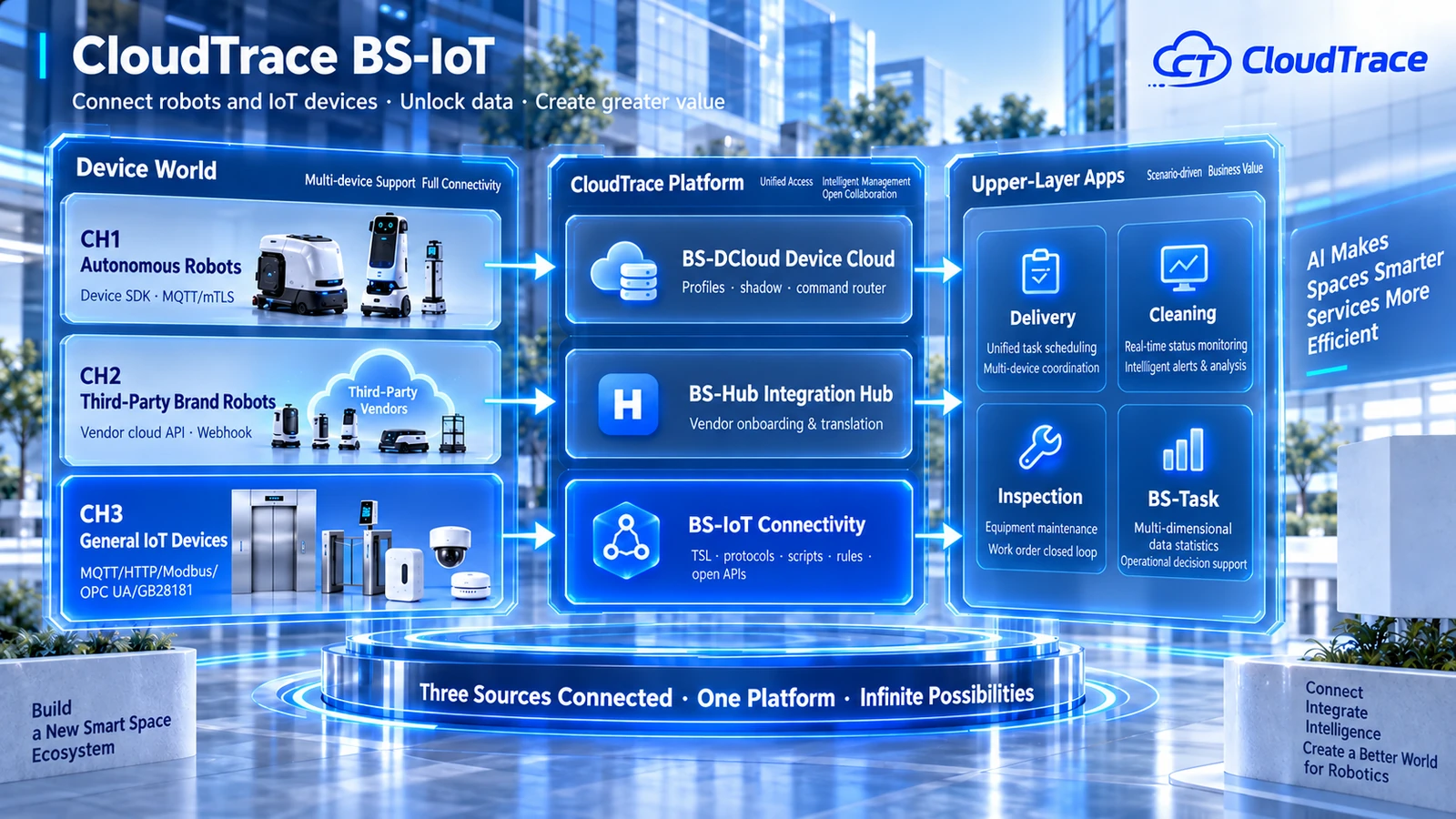
BS-IoT product architecture diagram
Click to enlarge
QUICK OVERVIEW

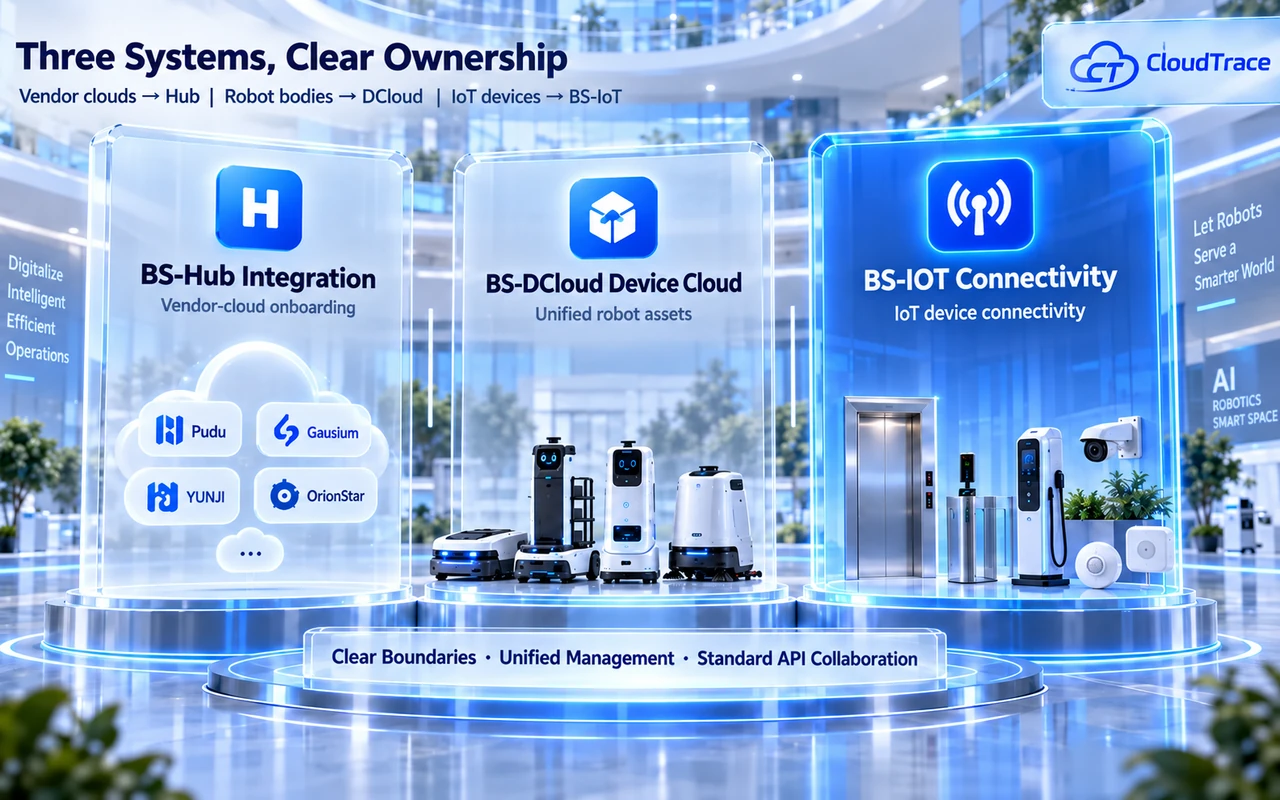
Three Systems, One Clear Division of Labor

Three-system diagram: Hub for vendor clouds, DCloud for robots, IoT for devices
Click to enlarge

BS-IoT connects devices of any protocol and any type via thing models, protocol plugins and parsing scripts, and exposes standard APIs to upper-layer apps. Vendor clouds go through BS-Hub, robot assets are managed by BS-DCloud, and IoT devices are handled by BS-IoT — no system takes over another's device ledger.

0
built-in protocol families
0
ready-to-use templates
Zero-code
standard protocol onboarding

BS-Hub: Vendor Clouds

Third-party vendor clouds are aggregated via open APIs and Webhooks. Hub only onboards and translates — it does not manage IoT devices.

BS-DCloud: Robot Assets

BS-DCloud owns robot profiles, device shadows and command routing. It never takes over BS-IoT's device ledger, and vice versa.

BS-IoT: Devices Themselves (This Page)

Elevators, doors, barriers, sensors and cameras connect via protocol plugins, with their full lifecycle closed inside BS-IoT.

PRODUCT VALUE

Robots Don't Work Alone — Devices Aren't Just for Watching

Three customer types, three answers, one platform foundation.

The hardest part of IoT onboarding isn't the protocol — it's starting from scratch for every device type. Before devices do any work, most of the budget is already gone.

For Scenario Operators

  • Robots wait at elevators, clean in the dark, and issues are found by patrols
  • Calling elevators, opening doors and reading sensors are all manual work
  • Every new automation idea means a bespoke vendor project on a monthly schedule
  • Robot + IoT orchestration: elevators, lights and auto-dispatch — humans handle only exceptions
  • Visual drag-and-drop rules your own operators can change, with dry-run before go-live
  • Separate device and robot ledgers — permissions, reports and maintenance stay clean

Recommended: Professional / Enterprise

For Robot Manufacturers

  • Tenders demand building-control integration and your bid scores poorly without it
  • Building your own IoT connectivity takes a dedicated team for a year or more
  • Every project's elevators and doors differ; per-project integration eats your margin
  • Ready-made IoT connectivity packaged into your solution — demo the bidding scenario on day one
  • Preset elevator/door/pile templates with zero-code standard protocol onboarding
  • Per-connection pricing makes companion costs measurable and quotable

Recommended: Starter / Professional

For Traditional IoT Projects

  • Modbus, OPC UA, private TCP and proprietary clouds — every device type means a mini dev project
  • Devices run 24/7; manual watching means anomalies become losses before anyone notices
  • Data stays trapped in the platform instead of flowing into your business systems
  • Onboarding shifts from projects to configuration: TSL + protocol params + one script for private protocols
  • Threshold alerts reach people in minutes, closing the loop into work orders automatically
  • Data flows back via open APIs / Kafka / HTTP — the platform is a hub, not a cage

Recommended: Starter / Enterprise

KEY ADVANTAGES

Six Capabilities That Make “Connect Everything” Verifiable

Robot + IoT Orchestration

Generic IoT platforms stop at connectivity; we make devices actionable nodes in robot workflows — elevators, lights, auto-dispatch.

▎Elevators · lights · auto-dispatch

Configurable Triple Kit

Thing model + protocol plugin + parsing script: zero-code for standard protocols, one script for private ones — onboarding shrinks from weeks to hours.

▎Zero-code standard onboarding

Sandbox Isolation

GraalVM sandbox with 4-dimension isolation; a failing script is contained and alerted without spreading or blocking other devices.

▎CPU ≤100ms · RAM ≤32MB

Tiered Time-series Storage

Hot 30 days / warm 1 year / cold archive with configurable retention — fast monitoring, complete analysis, economical compliance.

▎Hot 30d · warm 1y · cold archive

Open Data, No Lock-in

Open APIs + Kafka + HTTP callbacks + dashboards; device data flows back under authorization, with modular private deployment.

▎Query / invoke / subscribe APIs

Elastic Scale

Horizontally scalable gateways at ≥50k TPS per tenant — same architecture from dozens of devices to hundreds of thousands.

▎50k+ TPS per tenant

ARCHITECTURE

Three Channels in Place, Onboarding in Hours

Robots unify in DCloud, vendor clouds go through Hub, IoT devices connect via BS-IoT protocols — upper apps consume each through its own API.

BS-IoT three-source architecture: CH1 SDK / CH2 vendor cloud / CH3 protocols
Click to enlarge

Configurable Triple Kit: A New Device Type = 4 Configuration Steps

1

Product & Thing Model TSL

Property + event + service; 20+ preset templates to clone.

2

Protocol Configuration

MQTT / HTTP / TCP / CoAP / Modbus / OPC UA / WebSocket.

3

Parsing Script (Private Protocols)

Uplink decode / downlink encode in a sandbox with a simulator.

4

Device Onboarding

Direct / gateway sub-devices / API polling; single, Excel bulk, self-registration.

Dimension
BS-Hub
BS-DCloud
BS-IoT(本页)
Connects
Vendor clouds (open APIs + webhooks)
Robot bodies (CH1 native + CH2 third-party)
Devices & gateways directly (protocols)
Manages
Credentials, sync, translation, capabilities
Unified registry, shadow, command routing
Full lifecycle: profile, connect, shadow, data, debug
Typical objects
Pudu, Gausium, Ecovacs Commercial clouds
Delivery, cleaning, inspection, mowing robots
Elevators, doors/barriers, sensors, cameras, piles
Ledger
Robot profiles belong to DCloud
Never takes over BS-IoT's device ledger
Standalone iot_device registry with open APIs

Protocol Coverage

MQTT 3.1/5.0Available now
HTTP/HTTPSAvailable now
TCP/UDP CustomVia script
Modbus RTU/TCPVia edge gateway
GB28181/RTSP/ONVIFAvailable now
3rd-Party Cloud API PullComing soon
CoAPComing soon
OPC UAComing soon
CORE CAPABILITIES

Six Modules, One Closed Loop from Connection to Automation

Thing models / protocols / scripts / devices / rules / open data — the full FR-IOT-01 ~ 06 scope

Property + event + service: calling elevators, opening doors and turning on lights are all service calls
Versioned thing models with gray release — model changes don't interrupt managed devices
Export/import thing models as JSON and share templates across tenants
Standard property mapping (battery, location) keeps dashboards generic across categories
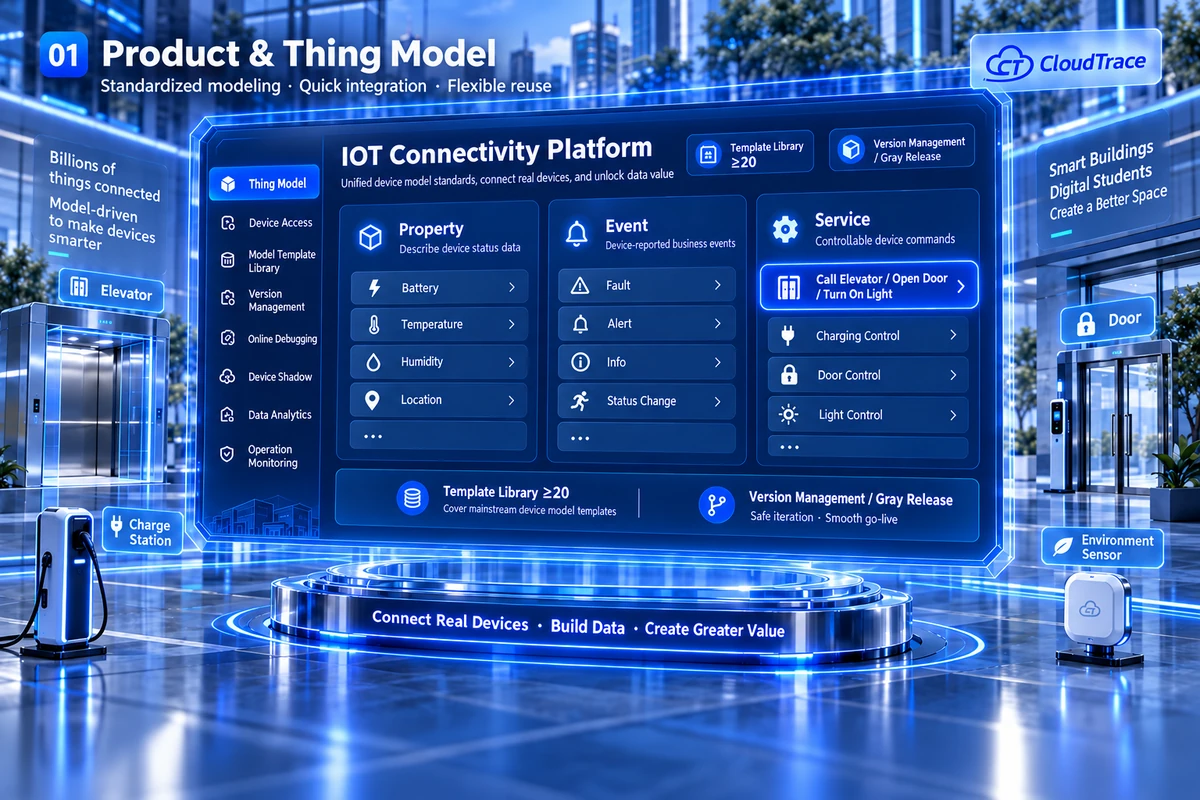
Product & Thing Model screenshot
Click to enlarge
USE CASES

Five Scenarios of “Robots + Everything”

Enterprise

Delivery Robots × Elevators

Robots wait at elevators; cross-floor delivery breaks the experience

Arrival event auto-calls the elevator to the current floor

Enterprise

Cleaning Robots × Lights & Doors

Night cleaning needs manual lights and doors, switched off zone by zone

Start cleaning → lights and corridor doors on; finish → auto reset

Professional

Sensors × Inspection Rounds

PM2.5, noise and water-level exceedances are found by manual patrols

PM2.5 exceedance auto-creates inspection tasks with alerts and work orders

Professional / Enterprise

Industrial Data Collection

Fragmented Modbus/OPC UA devices, manual data logging, experience-based anomaly detection

Edge gateway collection → time-series storage → Kafka/HTTP to MES/ERP

Starter / Professional

Robot Vendor Bundling

Tenders demand building-control integration; no ready IoT stack

BS-IoT packaged with the robot solution with ready templates

Synergy with Platform Apps

App
Synergy
BS-Task
IoT device services act as action nodes in mixed robot+device task workflows
BS-Map
Elevators, doors and piles become map resource layers constraining path planning
BS-Monitor
Video devices join the unified media stack; IoT alerts trigger video snapshots
BS-Maintain
IoT devices support parts, work orders and preventive maintenance
BS-Report
Device data feeds reports and dashboards directly
BS-DCloud
Alert center subscribes to IoT event streams; ledgers stay independent
BS-AI / Member / Mall
Environmental context for AI; member-app control of shared devices; plugins and templates commercialized
BY THE NUMBERS

Every Promise Is an Acceptance-checkable Metric

0
built-in protocol families
MQTT / HTTP / Modbus / OPC UA…
0
product templates
Piles, elevators, doors, cameras, sensors
0
sandbox CPU per run
Per execution · RAM ≤32MB · no net/file access
0
per-tenant TPS
Horizontally scalable gateways
0
service call latency
Rule engine action P95 ≤2s
0
hot data retention
Warm 1y / cold archive, configurable
0
devices per tenant
Three channels combined, platform-wide
Zero-code
standard protocol onboarding
Private protocols need just one script
PLANS

Three Plans for Every Integration Journey

Starter

Device Onboarding

Vendor bundling, IoT pilots, read-only devices

Professional

Most Popular

Automated Operations

Property/park automation, industrial collection

  • Fleet scale:10k-level via gateway aggregation
  • Protocol complexity:+ Modbus/OPC UA/video/cloud APIs + private-protocol scripts
  • Automation depth:+ visual rules, work-order loop, data forwarding
  • Parsing scripts:Script center + simulator
  • Robot integration:Custom via open APIs
  • Data openness:+ Kafka/HTTP/TSDB forwarding, dashboards
  • Deployment:SaaS

Enterprise

Converged Operations

Robot+building operators, private deployments

Make Your Robots Use Every Device in the Building

Tell us your device types and protocols — we'll reply with an onboarding assessment within 1 business day.

50k+ TPS per tenant · sandbox CPU ≤100ms · hot 30d / warm 1y / cold archive · SaaS & on-premise

Some interface images above are system mockups, not actual screenshots. The actual system UI is as demonstrated by our sales team.